

What is document processing automation, and which work does it take over?
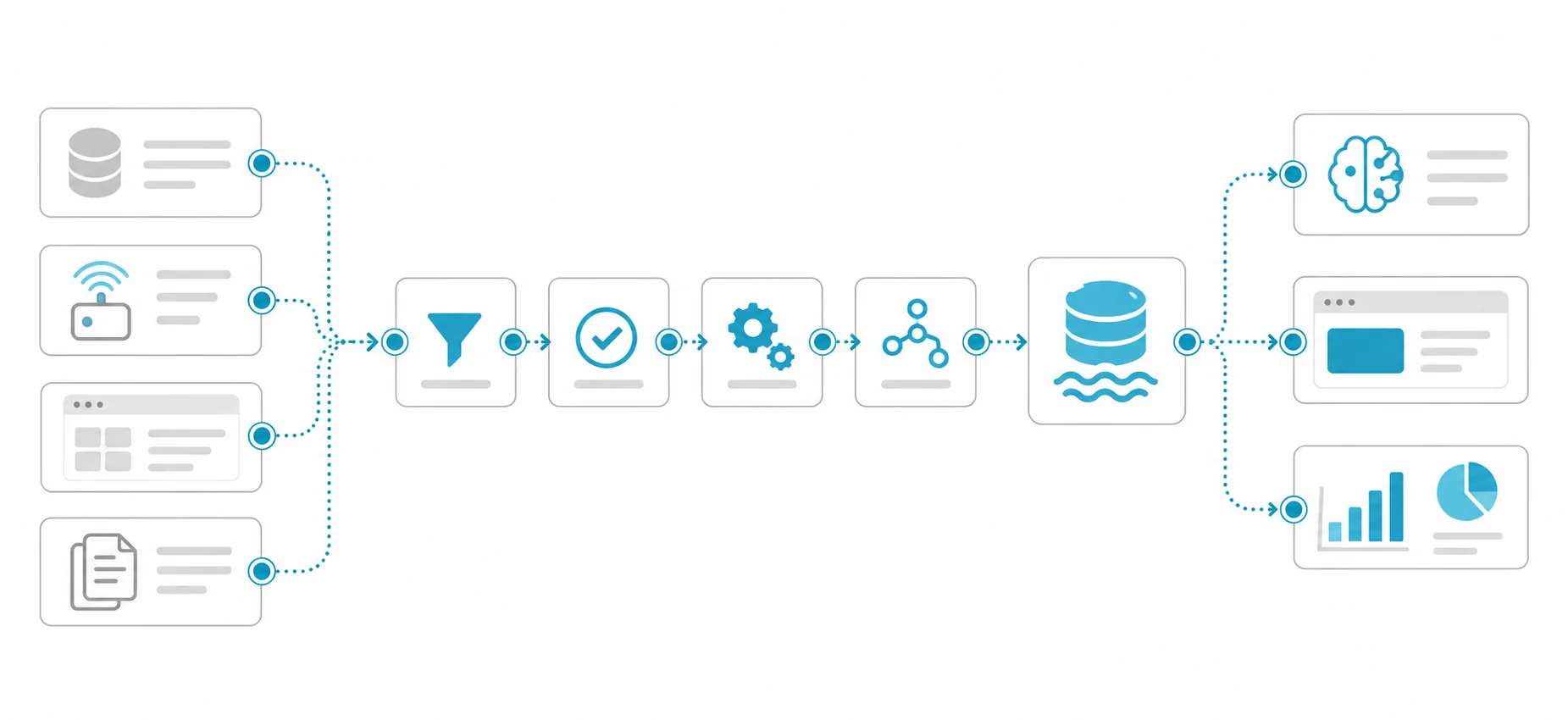
Document processing automation is a pipeline that reads the information you need from documents such as invoices, contracts and forms, checks it against rules and writes the result into an ERP, accounting or document management system. AI is only one step in that pipeline. In most projects, success depends less on the model than on where documents come from, what the validation rules are and who receives the unclear cases. A typical pipeline has five steps:
- Intake: Collect documents from email, scanners, portals, the e-invoice integrator or a shared folder, and stop the same document entering twice.
- Classification: Identify the document type (invoice, delivery note, contract, application form) and, where needed, the supplier or template.
- Extraction: Read the required fields and tables, and record where in the document each value came from.
- Validation: Check the values against format, arithmetic, master data and business rules.
- Review and handover: Write records that pass into the target system, and put the ones that fail in front of a person with the reason.
Write down from the start which work the automation will not take over. Approving a payment, the legal assessment of a contract clause or accepting an application stays with the authorised person; the pipeline brings that person verified data faster, with its source attached.
Do you need AI to read e-invoices?
Usually not: an e-invoice is already a structured data file, and the right approach is to read the file itself, not to recognise a picture of it. According to the Turkish Revenue Administration's e-Fatura page, the e-invoice has been in use since 5 March 2010, its data format and standard are set by the Administration, and it uses UBL-TR, an XML-based standard. Taxpayers registered in the e-Fatura system must send and receive the invoices they issue to each other as e-invoices; invoices to unregistered taxpayers are issued on paper or as e-Arşiv invoices.
So incoming invoices are not uniform. One accounts department can receive e-invoice XML files, e-Arşiv invoices by email, scanned paper invoices and PDFs from foreign suppliers side by side. Before starting a project, count the last few months' invoices by channel. Reading XML directly is the cheapest part of the automation; scanned and handwritten documents are the most expensive. A common mistake is to send the PDF rendering of an e-invoice through OCR, which turns exact data into a guess. Check whether you can get the XML file from your integrator, the e-Fatura portal or your ERP's e-document module.
When deciding which fields to extract from an invoice, start with the law. Article 230 of the Turkish Tax Procedure Law lists the minimum information an invoice must carry: date of issue, series and sequence number; the issuer's and the customer's name, trade name, address, tax office and number; the type, quantity, price and amount of the goods or services; and, for goods sold, the delivery date and delivery note number. That list is both the skeleton of your extraction schema and the basis of the "is a mandatory field missing?" check.
What is the difference between OCR, layout models and language models?
OCR reads text, a layout model understands where text sits on the page and how it is structured, and a language model draws meaning from free text; most document pipelines combine them.
| Approach | What it does | Strong at | Weak at |
|---|---|---|---|
| Classic OCR with template rules | Converts characters in the image to text; finds fields with fixed positions or label rules | Forms whose template never changes, a small number of suppliers | New layouts, skewed scans, tables; every new template needs new rules |
| Layout models and prebuilt document models | Combine text, its position and the page image; extract key-value pairs and tables | Invoices, receipts and forms whose layout varies by supplier | Need training data or language support for that document type; do not interpret the meaning of free text |
| Schema-based extraction with a language or vision-language model | Reads the text or image and fills the requested fields according to a schema | Free text such as contracts and correspondence, unexpected formats | Can produce a value the document does not contain; where each value came from must be checked separately |
Layout models such as LayoutLMv3 learn text, position and page image together; the paper lists form and receipt understanding and document layout analysis among its target tasks. Cloud providers' prebuilt invoice models belong to the same family. Still, check language support for each document type separately. For example, the language support page for Microsoft's Azure Document Intelligence lists Turkish and the Turkish lira for the prebuilt invoice model, but only US English for the prebuilt contract model. A product that "supports Turkish" does not necessarily support it for the document type you need.
The Donut paper names the weak points of OCR-based pipelines plainly: the computational cost of OCR, its inflexibility across languages and document types, and OCR errors propagating to later steps. The last one matters most in practice: if OCR reads an "8" as a "B", the next model can find the right field and still write the wrong value. So measure at the OCR step as well, not only at the final output.
Extraction with a language model is flexible but carries a different risk. OpenAI's structured outputs documentation states that the model will always try to adhere to the provided schema, that this can lead to hallucinations if the input is unrelated to the schema, and that structured outputs can still contain mistakes. A schema guarantees format, not correctness: a tax number missing from the document can be invented because the schema marks the field as required. The fix is to let every field take a "not found" value, ask for the source of each value (page and text span) and compare the value against that source.
Which approach fits which document type?
Choose the approach by how structured the document is and how costly an error would be. The table below gives a starting point by document type:
| Document type | Suggested approach | Required validation | When a person reviews |
|---|---|---|---|
| e-Fatura, and e-Arşiv invoices whose XML is available | XML parser; no model needed | Master data, duplicates, purchase order and delivery note match | Only on a business-rule conflict |
| PDF or scanned invoice (domestic or foreign) | OCR plus a layout model, or a prebuilt invoice model | Tax number format, totals and VAT arithmetic, order match | Field below threshold, totals that do not add up, new supplier |
| Fixed-template form | OCR, template rules, checkbox detection | Mandatory fields, ID number format, date range | Handwritten field, empty mandatory field |
| Free-form letters and petitions | Classification, then field extraction with a language model | Source text span, list of allowed values | When classification is unclear |
| Contract | Question answering or field extraction with a language model, with the source paragraph for each answer | Source supports the answer, annexes and amendments are taken into account | Always, if the result feeds a legal assessment |
What can automation do with contracts, and what should it not do?
With contracts, automation can find parties, dates, term, renewal, termination notice, penalty clauses and governing law and show each with its source; what a clause means legally is for a lawyer to decide. A contract is not a form. The same information can be spread across several clauses, an addendum may have changed a clause, and a term in the definitions section can shape how the whole contract reads. So the right output for a contract is not a single value but "the answer and the paragraph it rests on". Due diligence for acquisitions is a typical case: the same questions are asked across dozens or hundreds of contracts. Is there a restriction on assignment? Does a change of control trigger a termination right? How long does the non-compete last?
Caseon, Hatson Tech's own LegalTech product for due diligence and contract review, is one example of this approach. It also brings contract drafting and reporting into the same workspace; every answer is shown with the document excerpt it is based on, and the lawyer reviews the sources and approves the work. The product is still in development; our Caseon case study explains how it works.
What should you watch for with forms?
With forms, the hard parts are handwriting, checkboxes, signatures and the personal data the form carries. For fixed-template forms, classic OCR and position-based rules are often enough; the real work is telling old and new versions of a form apart and reliably detecting whether a checkbox is ticked. Measure handwritten fields on your own samples and plan a higher review rate for them from the start. Detecting that a signature is present is feasible; verifying whose signature it is, is a separate task.
Application and HR forms often contain personal data, and sometimes special categories such as health data. If documents will go to a cloud service, assess the cross-border transfer conditions in Article 9 and the data security obligations in Article 12 of Turkey's Personal Data Protection Law (KVKK, Law No. 6698). Article 12 makes the data controller jointly responsible for security measures with anyone processing data on its behalf. Extract only the fields you need, delete images and intermediate outputs when the retention period ends, and show personal data on the review screen only to authorised people.
How do you validate extracted data?
Do not rely on the model's confidence score alone; check every extracted value separately against format, arithmetic, master data and business rules.
- Format: Does the tax number have 10 digits and the national ID number 11? Is the date valid? Is the currency defined?
- Arithmetic: Does each line amount equal quantity times unit price, the subtotal the sum of the lines, the VAT amount the base times the rate, and the total the subtotal plus taxes?
- Master data: Is the supplier registered in the ERP? Do the tax number and IBAN match the stored details?
- Cross-document: Do the invoice, purchase order and goods receipt match on quantity and price?
- Duplicates: Has an invoice with the same series and sequence number from the same supplier already been entered?
- Business rules: Does the amount exceed an approval limit? Do payment terms match the contract? Is the supplier new?
Confidence scores are still useful, but only once calibrated on your own data. For example, measure on your test set how often a field returned with 0.9 confidence by a service is actually correct on your documents, then set thresholds field by field from that measurement and the cost of an error in that field. The threshold for amounts and tax numbers should be higher than for a description field.
How should human review be designed?
Route human review to the unclear records that rules and thresholds catch, not to every document, and sample the records that pass automatically as well. A good review design includes:
- A document is handed over automatically only when it passes every check and all critical fields are above threshold.
- The reviewer sees the suspect field highlighted on the document image, with the reason it was flagged, and does not have to read the whole document again.
- Every correction is recorded: which field, old value, new value, who and when. These records are both an audit trail and test data for the next measurement.
- A random sample of automatically handed-over documents is checked by hand at regular intervals; silent errors only show up this way.
- Hard-to-reverse steps such as payment are decisions for the authorised person, not for the automation.
Track the straight-through rate, the correction rate per field, errors found in sample audits and time waiting in review. Unless these are tracked by document type and supplier, a supplier changing its invoice template disappears into the average. Our article on human approval before agent actions covers how to enforce an approval step in software.
Hypothetical example: how do supplier invoices get into the ERP?
This example is hypothetical; the numbers only illustrate the method. A manufacturer receives about 2,000 supplier invoices a month, and the accounts team keys them into the ERP by hand. Counting the last three months by channel gives this picture:
| Channel | Share (hypothetical) | Processing route |
|---|---|---|
| e-Fatura XML | 65% | XML parser, then validation |
| e-Arşiv invoice (email attachment) | 15% | Parser if the XML is available, otherwise extraction from the PDF text |
| Foreign PDF invoice | 12% | Layout model or prebuilt invoice model |
| Paper invoice (scanned) | 8% | OCR plus layout model, higher review rate |
The company's first decision is that most of its invoices need no AI at all: an XML parser and validation rules cover them. Model investment goes to the remainder, the foreign PDFs and scanned paper. The second decision is to apply the same validation rules to all four channels. An invoice that arrives as XML still gets the order and delivery note match, the duplicate check and the IBAN check, because structured data is read correctly but a wrong invoice can be structured too.
For the pilot, the company samples every channel and its highest-volume suppliers, and has two people mark the correct values independently. Acceptance criteria are written before the pilot starts: target accuracy for the amount and tax number fields, the maximum error tolerated in sample audits of automatically handed-over invoices, and the list of reasons an invoice may be sent to review. Targets are set by measuring today's manual entry error rate; an unmeasured "99%" target is not written in.
What are the common mistakes in document processing projects?
The most common mistakes come from measurement and process design rather than from the model:
- Sending the PDF rendering of an e-invoice through OCR when its XML file is available.
- Measuring accuracy as a single number per document, without looking by field, document type and supplier.
- Making every schema field mandatory with no "not found" option.
- Treating a vendor's demo on its own sample documents as an acceptance test.
- Never sampling automatically passed records and not recording corrections, so repeated errors stay invisible.
- Not defining what happens when a supplier changes its template or a new document type arrives.
What should be settled before the project starts?
Settle document channels, the field list, validation rules, the test set and acceptance criteria before choosing a model:
- Document inventory: Types, channels, monthly volume, share of scanned and handwritten documents, languages.
- Field list: The fields needed for each document type, which are mandatory, and where they go in the target system.
- Validation rules: Format, arithmetic, master data, cross-document matching and business rules.
- Test set: Real documents, balanced by type and supplier, with correct values marked by two people.
- Data location and KVKK: Where documents will be processed, and retention and deletion rules.
- Acceptance and review: Targets per field, thresholds, and who reviews what.
The answer to "a prebuilt service or a custom pipeline?" also comes from this list. If your documents fit a prebuilt model's language and document-type support and your data location requirements are met, a prebuilt service is a quick start; intake, validation and integration are still built on your side. If your document types are unusual, data cannot leave the organisation, or extraction is part of a workflow that touches several systems, a custom pipeline may fit better. We compare OCR, object detection and vision-language models in our article on OCR and image recognition.
We build workflows that extract fields from invoices, orders and contracts, compare them with ERP records and flag mismatches, with human approval at critical steps, as part of our AI agent development service. If you would like to look at your document mix and validation needs together, the first meeting and the discovery work are free.